There are currently 3 different ways of acquiring data from NXCALS:
BTrainDataset
The hysteresis_scripts.data.BTrainDataset has a static method from_nxcals or maybe_from_nxcals (caches data locally, useful for notebooks where the same can be called multiple times) to retrieve data with start and end dates.
Scripts
Utilities scripts in the hysteresis-scripts Python have been package have been developed
Find Data
The hysteresis_scripts.mbi.find_mbi_data script has the following call signature
python -m hysteresis_scripts.mbi.find_mbi_data.py [-h] --start START [--end END] [-o OUTPUT] [--no-past NO_PAST] [--no-future NO_FUTURE]The script retrieves timing users and LSA cycles played between START and END (end is optional, by default START + 1 day), and finds where supercycles are changing, and displays the transitions to the user, so the user can determine which datasets to retrieve. An example of the selection screen:
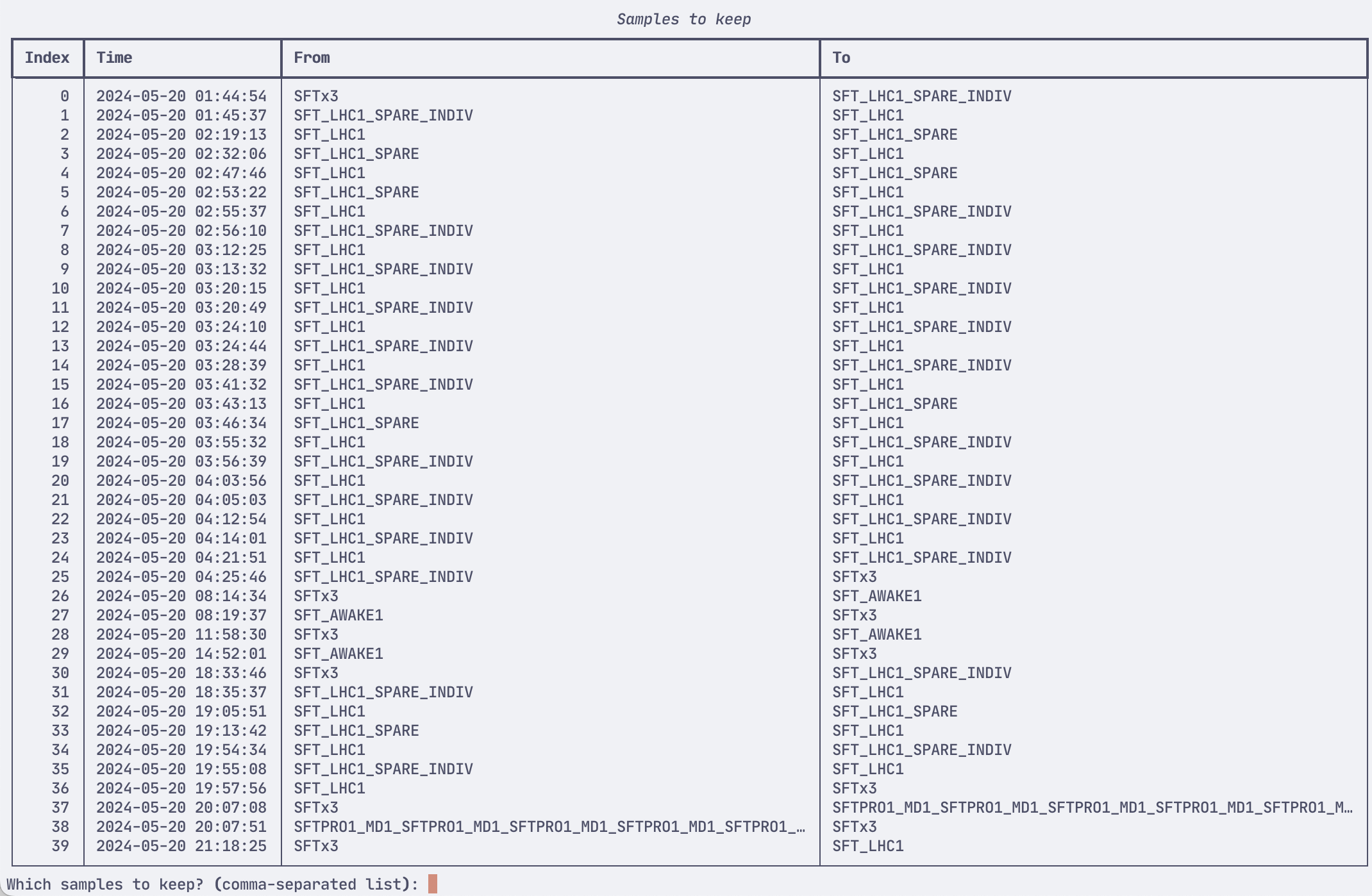
The --no-past and --no-future arguments control how many supercycles from the past, future from the transition (i.e. how many supercycles to include). Default is 1 in the past and 4 in the future (total 5 supercycles). This should be adjusted based on how many instances of a cycle is in a supercycle (e.g. standard SFT supercycle has 3x SFTPRO1 cycles).
And outputs a wiki:yaml file of the following format
samples:
- end: 2024-05-20 01:48:22 UTC
  start: 2024-05-20 01:45:37 UTC
  transition:
    from: SFT_LHC1_SPARE_INDIV
    to: SFT_LHC1
supercycles:
  SFT_LHC1:
  - SFT_PRO_MTE_L4780_2024_V1
  - SPS_TIMING_2021_V1
  - LHC_3inj_Nom_48b_Q20_2024_V1
  - MD_26_L60_Q20_2022_V1
  SFT_LHC1_SPARE_INDIV:
  - SFT_PRO_MTE_L4780_2024_V1
  - SPS_TIMING_2021_V1
  - LHC_INDIV_1inj_Q20_2024_V1
  - SPS_TIMING_2021_V1
  - SPS_TIMING_2021_V1
  - SPS_TIMING_2021_V1
  - SPS_TIMING_2021_V1
  - MD_26_L60_Q20_2022_V1
Which can be used for the subsequent script to download data.
Download data
The hysteresis_scripts.mbi.download_mbi_data script has the following call signature
python -m hysteresis_scripts.mbi.download_mbi_data [-h] -c CONFIG -o OUTPUT [--no-validation]And takes the yaml file of the previous script as input, and downloads current, field, and field derivative data using the BTrainDataset class. The filenames are automatically set based on the timestamp of the acquired data (start and end), as well as the supercycle name.
A sample filename is:
SPS-BTRAIN-20240520_014537_20240520_014822_SFT_LHC1_SPARE_INDIV___SFT_LHC1.parquetThe ID of the dataset is determined by the supercycle transition. Here SFT_LHC1_SPARE_INDIV → SFT_LHC1 transition.
The --no-validation flag suppresses automatic dataset validation. The validation calculates , where , and asserts that the residual is less than 0.1. The validation ensures that the field response recorded in NXCALS is not simulated or missing.
Make figures
The hysteresis_scripts.mbi.make_figures script has the following call signature
make_figures.py [-h] [-o OUTPUT_DIR] [-d DOWNSAMPLE] input_dataAnd finds all *.parquet in the subdirectory, and plots the current and field as time series, the field residual when the Calibration function is subtracted, and the current/field phase space, and saves the plots as wiki:svg files in the output directory. This script is useful when needing to catalogue the downloaded datasets.
Find, download and plot data
A convenience entrypoint hysteresis_scripts.mbi.find_download_plot with the following call signature is developed:
python -m find_download_plot.py [-h] --date DATE [--no-past NO_PAST]
                                [--no-future NO_FUTURE] [-o OUTPUT_DIR]
N.B. This script has to be run as a module
The script calls Find Data, where the user should select one supercycle transition, whereafter the data is downloaded, figures created and saved, and then finally plots are shown to the user. This allows the user to easily iterate different acquisitions with different settings (different number of future and past supercycles, or different transitions), and view the data directly in a single command call.
The downloaded MBI data, figures, and configuration YAML file is collected in the output directory, and can be treated directly as a dataset.
The folder structure can be the following:
SFT_AWAKE1___SFT_AWAKE1_MD/
├─ samples.yml
├─ SFT_AWAKE1___SFTPRO1_AWAKE1_MD1_SFTPRO1_AWAKE1_MD5_MD1_residual.svg
├─ SFT_AWAKE1___SFTPRO1_AWAKE1_MD1_SFTPRO1_AWAKE1_MD5_MD1_transfer_function.svg
├─ SFT_AWAKE1___SFTPRO1_AWAKE1_MD1_SFTPRO1_AWAKE1_MD5_MD1_timeseries.svg
├─ SPS-BTRAIN-20240422_121913_20240422_122228_SFT_AWAKE1___SFTPRO1_AWAKE1_MD1_SFTPRO1_AWAKE1_MD5_MD1.parquet
App B-Train data
A GUI Application was developed to simplify acquiring data from NXCALS, and uses the BTrainDataset as backend.